

CareNova — Clinic & Medical Practice Management System | Next.js 14, Supabase, TypeScript
CareNova is a modern, production-ready Clinic Management System built for dental practices, general medical clinics, and ophthalmology centers. Developed with Next.js 14 App Router, Supabase, Drizzle ORM, and TypeScript, CareNova gives developers, agencies, and clinics a serious, fully-architected foundation to manage and run real healthcare operations — without spending months building from scratch.
Unlike generic admin dashboard templates, CareNova is built around real clinical workflows: patient intake → appointment scheduling → medical records → prescriptions → invoicing → payment collection. Every module follows the same clean pattern — making the codebase immediately understandable and extensible for any development team.
Whether you are a developer building a clinic product, an agency delivering for a healthcare client, or a clinic ready to deploy and run their operations today — CareNova is the most complete Next.js-based clinic management solution available. And if you need custom features tailored to your specific practice, we offer custom development services on top of CareNova to make it exactly what you need.

Live Demo |
Documentation |
Contact: dev010contact@gmail.com
What is CareNova?
CareNova is a Clinic Operating System — not a template. It is a complete, domain-first clinic management platform with 15+ fully functional modules covering every aspect of running a medical or dental practice. Built on the latest full-stack web technologies, it is SaaS-ready, multi-role, and multi-clinic-type out of the box.
It ships with a real PostgreSQL schema, server-side role-based access control, type-safe queries via Drizzle ORM, and a consistent component architecture that mirrors how production SaaS products are built. Every module follows the same data flow: Server Component → Server Action → Zod Validation → Database Mutation → Path Revalidation.
CareNova supports three clinic types — Dental, Ophthalmology, and General Medical — each with a fully branded public landing page, specialized navigation, real-time notifications, and clinic-specific modules like the interactive Odontogram for dental practices.
Key Highlights
- ✅ Next.js 14 App Router — Server Components, Server Actions, Streaming, Suspense
- ✅ Full TypeScript — Strict mode, zero
anytypes, build-verified clean - ✅ Supabase Auth + PostgreSQL — Managed auth, cookie sessions, RLS-ready
- ✅ Drizzle ORM — Type-safe queries, migrations included, no raw SQL sprawl
- ✅ 4 Role Dashboards — Admin, Doctor, Receptionist, Nurse — each fully tailored
- ✅ 3 Clinic Types — Dental, Ophthalmology, General with full landing pages
- ✅ 15+ Complete Modules — From patients to billing, inventory to blog
- ✅ Real-Time Notifications — Admin notified on bookings, signups, and key events
- ✅ Staff Approval Workflow — Admin approves or declines new staff signups
- ✅ Granular Permission Control — Admin controls exactly what each role can access
- ✅ Full Dark Mode — Every component, every state, every module
- ✅ Interactive Odontogram — 32-tooth dental charting with condition tracking
- ✅ Financial Management — Invoices, payments, expenses, revenue analytics
- ✅ Audit Logs & Security — Auth logs, session tracking, brute-force protection
- ✅ Seed Data Included — Realistic demo data so you can start immediately
- ✅ i18n Ready — English, French, Spanish, Arabic via next-intl
- ✅ Custom Development Available — Need specific features? We build them for you
Admin Dashboard — Complete Clinic Overview
The Admin Dashboard gives clinic owners and managers a real-time overview of all operations. Today’s appointments, total active patients, monthly revenue, low-stock alerts, outstanding invoices, and revenue vs. expense charts — all in one place. Each role sees a dashboard tailored to their responsibilities: Admins see financial analytics and full clinic health, Doctors see their daily schedule and patient queue, Receptionists see the billing queue and today’s appointments, Nurses see patient records and low-stock inventory alerts.

Four Role Dashboards — Built for Real Clinic Workflows
CareNova is not a single dashboard shared by everyone. Each of the four roles gets a completely different experience — tailored navigation, tailored widgets, and tailored permissions. Here is exactly what each role can do:

Admin
The Admin has full system access and is the central authority of the entire clinic. The Admin dashboard shows financial health, clinic-wide activity, staff management, and system configuration all in one place.
- ✅ Full access to all modules — patients, appointments, records, billing, staff, inventory
- ✅ Manage all staff accounts — approve or decline new staff signups
- ✅ Control the permission matrix — decide exactly what each role can see and do
- ✅ View financial analytics — revenue, expenses, net income, outstanding invoices
- ✅ Manage clinic settings — branding, clinic type, landing page, colors, SEO
- ✅ Access the auth audit log — every login, logout, and failed attempt recorded
- ✅ Receive real-time notifications — new bookings, staff signups, low stock alerts
- ✅ Manage departments, services, lab vendors, blog, and landing page content
Doctor
The Doctor dashboard is built around clinical workflows. Doctors focus on patient care — their dashboard shows today’s schedule, recent patients, and upcoming appointments without financial or operational clutter.
- ✅ View and manage their personal appointment schedule
- ✅ Access full patient profiles — history, allergies, previous records
- ✅ Create and manage medical records — vitals, clinical notes, diagnoses, attachments
- ✅ Write and manage prescriptions — medication, dosage, drug interactions
- ✅ Order and view lab test reports linked to patient and appointment
- ✅ Access the Odontogram for dental chart management (dental type only)
- ✅ Update appointment status — confirmed, completed, cancelled
️ Receptionist
The Receptionist dashboard is the front desk command center. Everything needed to handle the day — bookings, patient check-ins, billing, and payments — is surfaced front and center.
- ✅ Book, reschedule, and cancel appointments for any patient and doctor
- ✅ Register and manage patient profiles
- ✅ Create and manage invoices — services, discounts, tax, insurance
- ✅ Record payments against invoices and track payment history
- ✅ View the billing queue — outstanding and unpaid invoices at a glance
- ✅ Access today’s schedule with full appointment status
Nurse
The Nurse dashboard is built for clinical support workflows — patient care, vitals recording, inventory monitoring, and record management.
- ✅ View and manage patient profiles and full medical history
- ✅ Record and manage medical records — vitals, clinical notes, attachments
- ✅ View and support appointment schedules
- ✅ Monitor inventory levels — stock, reorder alerts, expiry tracking
- ✅ View lab test reports and sample types
- ✅ Access low-stock alerts directly on the dashboard
Granular Permission Control — The Admin Decides Everything
CareNova includes a powerful permission management system that goes far beyond simple role assignment. The Admin opens the Permissions panel and controls — module by module, action by action — exactly what each role is allowed to do. Every permission check is enforced server-side, inside every Server Action, before any data is read or written. This is not UI hiding — it is real access control.

The permission matrix covers every key area of the system:
- analytics. — Who can see financial and activity analytics
- appointments. — Who can create, edit, cancel, export appointments
- patients. — Who can view, create, edit, delete, export patient records
- billing. — Who can create invoices, record payments, manage expenses
- medical_records. — Who can add vitals, clinical notes, diagnoses, attachments
- prescriptions. — Who can create and manage prescriptions
- test_reports. — Who can manage lab tests and test reports
- inventory. — Who can view, update, and manage stock
- staff. — Who can view and manage staff profiles
- services. — Who can manage clinic services
- departments. — Who can manage departments
- settings. — Who can access clinic and system settings
- odontogram.* — Who can access dental chart management
Admins always retain full access. All other roles are fully configurable — a clinic can give a nurse billing access, restrict a receptionist from medical records, or grant a doctor inventory visibility — all from the UI, instantly, without any code changes.
Real-Time Notifications — Always in the Loop
CareNova includes a built-in notification system that keeps the right people informed about the right events — automatically.

- New appointment booked — Admin notified instantly when a patient or receptionist books an appointment
- New staff signup — Admin notified when a new staff member registers and is waiting for approval
- Staff approval / decline — Staff member notified when their account is approved or declined
- Low stock alerts — Relevant staff notified when inventory falls below minimum levels
- Overdue invoices — Admin and receptionists see overdue invoice warnings on their dashboard
Staff Signup & Approval Workflow
CareNova includes a secure staff onboarding flow that ensures no unauthorized access to the clinic system.
- New staff member signs up with email and password
- Email confirmation is sent automatically via Resend
- After confirmation, the account is marked as pending approval
- Admin receives a notification — a new staff member is waiting for review
- Admin approves or declines the account from the dashboard
- Staff member is notified of the decision — approved accounts get immediate access
- Declined accounts are locked out with a clear message
Core Modules
⚕️ Patient Management
A complete patient management system with full demographic profiles, blood group, emergency contacts, medical history, allergies, and document uploads. Each patient has a full profile sheet showing their appointments, prescriptions, invoices, and medical records in one slide-out panel. Advanced search, filters, pagination, bulk actions, and CSV export are all included.

Appointment Scheduling
A full appointment scheduling system with a calendar view (powered by dnd-kit), doctor and service assignment, status tracking (pending, confirmed, completed, cancelled), and conflict-free booking. When a new appointment is booked, the admin receives an automatic notification. CSV export and reminder tracking are built in.

Medical Records
A structured electronic medical records module with sub-sections for Vitals (BP, heart rate, temperature, weight, height, BMI), Clinical Notes, Diagnoses (ICD codes, active/resolved status), Attachments, and a Visit Timeline with both card and Gantt views. Every entry is linked to the patient, doctor, and appointment.

Odontogram — Interactive Dental Chart
An interactive dental charting system with a full 32-tooth odontogram. Dentists can click individual teeth, mark conditions, track treatments, add diagnoses and notes, and version the chart per visit. Exclusive to the dental clinic type.

Prescriptions
Doctors can create detailed prescriptions with medication name, dosage, frequency, duration, instructions, drug interaction notes, and pharmacy details. Prescriptions are linked to the patient, appointment, and optionally to an inventory item for automatic stock tracking.
Lab Test Reports
A complete laboratory management module covering test categories, methodologies, turnaround times, sample types, lab tests, and full test report entries per patient. Integrates with the Lab Vendors module for external lab management.

Billing — Invoices, Payments & Expenses
A full medical billing system with invoice creation (line items, discounts, tax, insurance fields), payment recording, and expense tracking by department, category, and vendor. Revenue vs. expense charts give a monthly financial overview. No external payment gateway required — fully self-contained.

Clinic Operations
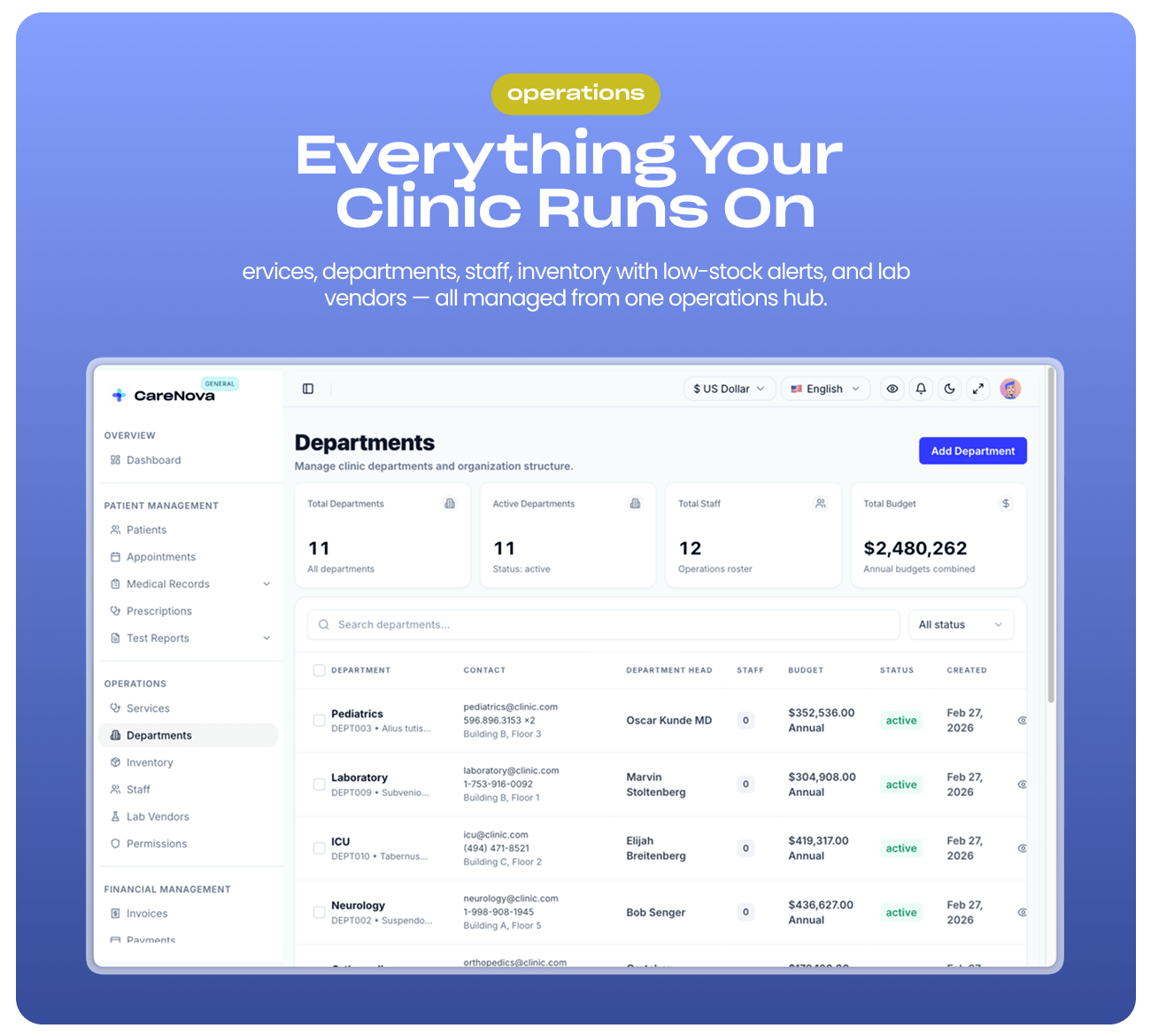
Manage every operational aspect of the clinic: Services (pricing, duration, max bookings per day), Departments (codes, heads, budgets), Staff (profiles, schedules, salaries), Inventory (stock levels, reorder alerts, expiry, batch numbers, suppliers), and Lab Vendors (contracts, ratings, specialties, turnaround hours).
Configurable Public Landing Pages
CareNova includes a fully editable public marketing website for each clinic type. Dental, Ophthalmology, and General clinics each have their own hero section, services, pricing, blog, and footer — all configurable from the Admin’s Landing Settings panel. Colors, branding, content, and SEO fields are editable without touching code.

Who Is CareNova Built For?
Clinics & Medical Practices — Deploy and Run Today
CareNova is not just for developers. If you run a dental practice, ophthalmology center, or general medical clinic, you can purchase CareNova and deploy it as your clinic’s full operating system. Every workflow your team needs is already built — patient management, appointment scheduling, billing, medical records, staff management, and a public-facing website — all in one system.
And if you need something specific to your practice — we offer custom development services. Tell us what you need and we will build it on top of CareNova, tailored exactly to your workflow.
Developers & Freelancers — Ship Faster for Clients
CareNova gives you a production-quality clinic foundation in hours instead of months. Every module is built, every schema is designed, every role is implemented. You customize and deliver — not architect and build from zero.
Agencies — A Codebase Your Whole Team Understands
Every module follows the same pattern. A developer who has never seen the codebase can open any module and immediately understand it. Onboard team members fast and deliver clinic products at scale.
Entrepreneurs & SaaS Builders — Production-Ready Bones
Building a clinic SaaS? CareNova is already architected for multi-tenancy. The schema, auth system, and permission layer are designed to scale from a single clinic to hundreds.
Need Something Custom? We Build It For You.
Every clinic is different. If your practice has specific workflows, integrations, or features not in the standard product, we offer custom development services to extend CareNova to your exact needs.
- Custom module development (physiotherapy, vaccination records, optical prescriptions, etc.)
- Third-party integrations (payment gateways, SMS providers, lab APIs, EHR systems)
- Custom reporting and analytics dashboards
- White-label branding and custom domain setup
- Multi-branch / multi-location clinic support
- Patient portal with self-service appointment booking
- Telemedicine and video consultation integration
Contact us at dev010contact@gmail.com — we respond within 24–48 hours on business days.
Why CareNova — Not Another Admin Template
- Real data model: Tables designed around actual clinical workflows — not generic entities
- Real auth: Supabase sessions, brute-force protection, audit logs, session tracking
- Real permissions: Server-side enforcement on every action — not just hiding buttons
- Real notifications: Admin kept informed of every key event automatically
- Real staff control: Approval workflow ensures only authorized people get access
- Real architecture: The same consistent pattern used in production SaaS products
- Real build:
npm run buildpasses clean before every release - Real support: A team that also builds custom features — not just a code dump
One Codebase. Three Clinic Types. Three Complete Products.
CareNova ships with three fully distinct, production-ready clinic configurations out of the box — each with its own public landing page, navigation, branding, color theme, and specialty-specific modules. Switching clinic type takes a single configuration change.

Dental Clinic
- ✅ Interactive 32-tooth Odontogram with condition and treatment tracking
- ✅ Dental-specific landing page — hero, services, pricing, team, blog
- ✅ Dental color theme and navigation — Odontogram replaces generic Medical Records sub-pages
- ✅ Full patient profiles with dental history and attachments

️ Ophthalmology Clinic
- ✅ Ophthalmology-specific landing page — hero, services, team, blog, footer
- ✅ Deep teal and navy color theme communicating precision and professionalism
- ✅ Full Medical Records module adapted for eye examination workflows
- ✅ Clinical notes and diagnoses for visual acuity, IOP, and prescriptions

General Medical Clinic
- ✅ General medicine landing page — hero, services, team, blog, footer
- ✅ Complete Medical Records — vitals, notes, ICD diagnoses, attachments, visit timeline
- ✅ Prescription management, lab reports, billing, and inventory all included

⚙️ Demo Mode — Show Clients Instantly
Visit ?clinic=dental, ?clinic=ophthalmology, or ?clinic=general to switch the entire public landing page live in the browser — persisted for 7 days via cookie. Show any client exactly what their practice would look like in seconds.
app.carenovasoftware.com/?clinic=dentalapp.carenovasoftware.com/?clinic=ophthalmologyapp.carenovasoftware.com/?clinic=general
Technology Stack
| Layer | Technology |
|---|---|
| Framework | Next.js 14 (App Router, Server Components, Server Actions) |
| Language | TypeScript 5.6 — strict mode, zero any types |
| Database | PostgreSQL via Supabase |
| ORM | Drizzle ORM 0.36 — type-safe queries, migrations included |
| Authentication | Supabase Auth with @supabase/ssr — HTTP-only cookie sessions |
| UI Components | shadcn/ui (Radix UI primitives) |
| Styling | Tailwind CSS 3.4 — full dark mode support |
| Forms | React Hook Form + Zod schema validation |
| Animations | Framer Motion 12 |
| Charts | Recharts 3.7 |
| Calendar DnD | @dnd-kit 6.3 |
| i18n | next-intl 4.8 — English, French, Spanish, Arabic |
| Resend — transactional auth emails | |
| Deployment | Vercel + Supabase |
Architecture Highlights
Server Component → Server Action → Zod Validation → Drizzle DB Mutation → revalidatePath
- Performance-first: memoized rows,
useCallbackhandlers, dynamic imports,Promise.allfor parallel DB calls - Module-level caching for clinic data (5-minute TTL) with manual invalidation
- Per-request React cache for user and session data — no redundant DB calls
- Database indexes on frequently queried columns
- Transaction pooler-compatible Drizzle setup for Supabase connection limits
What’s Included
- Complete Next.js 14 source code — all 15+ modules, fully functional
- ️ Full Supabase PostgreSQL schema — 30+ tables, enums, indexes, relationships
- Drizzle migrations — ready to push to any Supabase project
- Seed scripts — realistic demo data for all modules
- Storage bucket setup guide — avatars, landing assets
- Full environment variable reference — every variable documented
- Setup and deployment guide — Vercel + Supabase step by step
- Authentication documentation — flows, session handling, RBAC
- Permissions audit report — full RBAC coverage documentation
Complete Module List
- Patient Management (profiles, history, documents, CSV export)
- Appointment Scheduling (calendar, status tracking, admin notifications)
- Medical Records (vitals, clinical notes, diagnoses, attachments, visit timeline)
- Odontogram — Interactive 32-tooth Dental Chart (dental only)
- Prescriptions (medication, dosage, drug interactions, pharmacy, inventory link)
- Lab Test Reports (tests, methodologies, turnaround times, sample types)
- Invoices (line items, discount, tax, insurance, status)
- Payments (record against invoices, payment history)
- Expenses (category, department, vendor, receipt)
- Financial Analytics (revenue vs expenses chart, activity chart, overdue banner)
- Services (pricing, duration, max daily bookings, prerequisites)
- Departments (codes, heads, budgets, contact info)
- Staff (profiles, roles, schedules, salary records)
- Inventory (stock levels, reorder alerts, expiry, batch numbers, suppliers)
- Lab Vendors (contracts, ratings, specialties, turnaround hours)
- Role-Based Permissions (granular matrix, admin-configurable, server-enforced)
- Notifications (booking alerts, staff signup approvals, low stock, overdue invoices)
- Staff Signup & Approval Workflow (pending → admin review → staff notified)
- Blog (public + dashboard, categories, SEO fields)
- Public Landing Pages (dental, ophthalmology, general — fully configurable)
- Landing Settings (branding, colors, content, SEO — admin panel, no code needed)
- Auth Audit Log + Session Tracking
- Settings (profile, clinic, preferences, version)
Support
6 months of item support is included with every purchase.
- Email: dev010contact@gmail.com
- Documentation: carenova.featurebase.app/en/help
- ⏱️ Response time: 24–48 hours on business days
- Covers installation help and verified bug reports
- ➕ Extended 12-month support available as an add-on
- ️ Custom development available — contact us for a quote
Updates
All buyers receive free updates — bug fixes, compatibility updates, and new features. Every release passes npm run build clean before publishing.
Coming in future updates:
- AI Diagnostics — Gemini integration for clinical notes and X-ray analysis
- SaaS Multi-Tenancy — multiple clinics, one deployment
- Stripe Billing — subscription management
- Payroll Module — full staff payroll management
- Patient Portal — self-service appointment booking for patients
Important Notes
- Requires Node.js 18+ and a Supabase account (free tier works for development)
- Basic familiarity with Next.js and TypeScript is recommended for developers
- Clinics deploying directly can follow the step-by-step install guide included in the package
- AI Diagnostics is architecture-ready — hooks are in place for the next release phase
- The Regular License covers a single clinic deployment
- The Extended License covers SaaS usage and resale rights
- Custom development inquiries: dev010contact@gmail.com
CareNova is the most complete Next.js clinic management system available — combining a real patient management system, medical appointment scheduling, dental practice management software, ophthalmology clinic management system, general medical clinic software, electronic medical records, interactive odontogram, medical billing system, role-based healthcare dashboard, real-time notification system, and staff approval workflow in one clean, production-ready codebase. Three clinic types, three complete landing pages, four role dashboards, granular permission control — one purchase. Built for developers, agencies, and clinics who want to ship and run real healthcare software — not just demos.
In order to download you need to register on the website and top up your points balance. Before making a purchase, please read our terms and conditions on this page: https://codegood.net/tos.
After registering and refilling your points balance you need to go to the product page and click Download for x points and Download button one by one. After that the download will start automatically via a direct link.
Please note, our site has a point system and we don't have any hidden or recurring fees, so you are purchasing the current version of the digital product without the option of a free update. If you need a product updates in the future, you can create ticket request update (not free update)
If you need help, please read the answers to popular questions on this page first: https://codegood.net/faq. To get any other help on the product you can create a support ticket on the site: in the main menu user.
Before making a purchase, please read the Terms and Conditions on this page: https://codegood.net/tos
All digital products are purchased without the possibility of free updates or support update. We do not provide any license keys or product support. Please first read the FAQ on this page: https://codegood.net/faq
Please note, our site has a point system and we don't have any hidden or recurring fees, so you are purchasing the current version of the digital product without the option of a free update. If you need a product updates in the future, you can always download them using your point balance.
Please note that any digital products presented on the website do not contain malicious code, viruses or advertising. You buy the original files from the developers. We do not sell any products downloaded from other sites.
You can download the product after the purchase by a direct link on this page.
100% Download Available
No waiting. The link is always available after your successful payment.
Cheapest Price
Thats our philosophy! Building your dream website is no longer cost effective.
Safety, Guarantees Files
Guaranteed Safety, no Malware, Virus, Spyware...